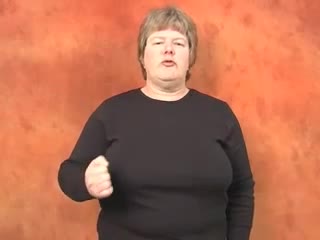
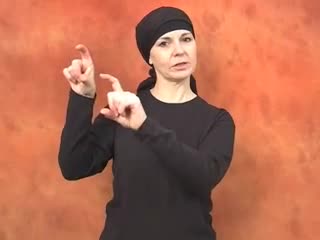
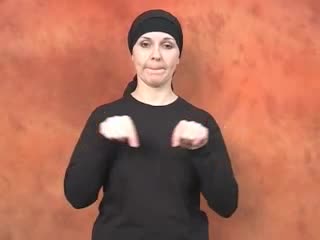
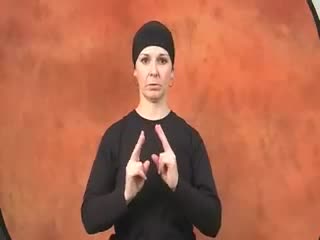
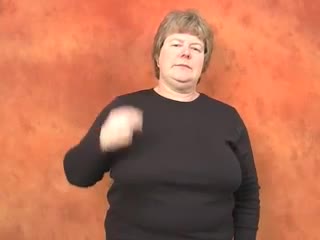
What This Sign Means in BSL
The BSL sign for webcam is a wonderfully illustrative one, capturing the essence of the device with a simple, direct movement. At its core, it visually represents the lens of a camera that's observing or recording. It's a relatively modern sign, evolving as technology has become more integral to our daily lives, particularly with the rise of video calls and online communication. You’ll notice its clarity; there’s little ambiguity, making it quite intuitive once you understand its components.
This sign doesn’t just represent the physical object, but also the action it performs – capturing visual information. The handshape, a dominant 'C', directly mimics the circular lens of a camera, while its placement and movement reinforce the idea of a camera positioned to see you or a scene. It's a sign that feels very much 'of its time', reflecting how BSL continuously adapts to incorporate new concepts and technologies into its rich visual language.
What makes this sign particularly noticeable is its specific targeting of the eye-level area. This isn't just an arbitrary placement; it signifies where a webcam is typically situated – either mounted on a monitor, built into a laptop, or positioned to look directly at a person's face. It’s a sign that speaks volumes about the function of the device without needing complex explanations, relying on visual logic that many find easy to grasp.
When This Sign Feels Natural
This sign feels most natural in any context where you’re discussing the specific device that enables video communication or recording through a computer. Think about everyday scenarios: asking a colleague to turn on their video during an online meeting, explaining technical issues with a device, or even discussing privacy concerns related to constant surveillance. It's a common sign in both casual conversations and more formal settings like educational workshops or professional presentations about technology.
You’ll use "webcam" frequently when coordinating virtual interactions. For instance, when you're setting up a video call with friends or family, or troubleshooting a connection problem. It's precise, meaning you wouldn’t typically substitute it with a more general sign for "camera" if you specifically mean the small device integrated with or attached to a computer for live video feeds. Its usage is quite focused on its digital, interactive purpose.
However, it’s important to note when you might choose a different sign. If you’re talking about a traditional still camera for photography, there’s a distinct sign for that. Similarly, if you’re referring to a professional video camera or camcorder, different signs apply. The BSL sign for webcam is reserved for that specific, often smaller, internet-connected device. So, while it's versatile within its niche, be mindful of its boundaries to maintain clarity in your signing.
What Learners Usually Miss
One common subtlety learners often miss with the BSL sign for webcam is the precise formation and orientation of the dominant hand's 'C'-shape. It's not just a loose curve; it should be a clear, defined 'C', with your palm facing slightly towards you, as if framing a view. Some learners make the 'C' too wide or too narrow, or angle their palm downwards, which can obscure the intended visual representation of a camera lens. The correction here is to practice making a firm, clear 'C', keeping your fingers gently curved and your palm angled slightly inwards, like a lens looking out.
Another area where precision is key is the location and movement. The sign isn't just placed anywhere around the face; it’s specifically near eye-level, often just slightly above or to the side of your dominant eye, mimicking where a webcam would typically sit on a monitor or laptop screen. The movement is a distinct, subtle forward arc – not a shake, a hold, or a larger sweep. It’s a gentle, deliberate push forward, almost as if the camera is 'activating' or 'projecting' its view. Learners sometimes rush this, making the arc too big or too fast, or neglecting it entirely. Focus on that controlled, small arc to convey the action accurately.
Finally, while facial expression for this sign is usually neutral, its absence can sometimes be a missed opportunity for learners. If you’re asking "Is your webcam on?", a subtle questioning eyebrow raise or a slight tilt of the head adds naturalness and clarity to the question, rather than just signing the word flatly. For this particular sign, the most important correction is usually about refining the handshape, exact placement, and controlled movement, ensuring they accurately reflect the physical device and its function, rather than just a vague approximation.
A Simple Way to Remember It
Thinking about how the sign visually represents the device can make it incredibly sticky in your memory. Imagine your dominant hand forming the circular lens of a webcam, positioned right where it would be on your computer, capturing your image. The slight forward arc is like the camera coming to life, ready to project or record. It's a mini-story told with your hand, directly linking form to function.
- The 'C' for 'Camera': Your dominant hand forms a clear 'C', directly representing the round lens of a camera.
- Eye-Level View: The sign is performed near your eye, exactly where a webcam is typically placed to capture your face, creating an immediate visual connection.
- Projecting Arc: The gentle forward arc movement suggests the camera is "on" and "sending" out images or "capturing" what's in front of it.
Short Practice Situations
- "Shall we turn on our webcams for the meeting so we can all see each other clearly?"
- "My webcam isn't working today, so you'll just see my name on the screen, apologies."
- "I always make sure my background is tidy when my webcam is on, just in case."
- "Could you adjust your webcam slightly? Your face is a bit cut off at the top."
- "Many deaf people rely on webcams for visual communication, especially for remote work."
Signs to Learn Next
- COMPUTER: Webcams are almost exclusively used in conjunction with computers, making this an essential related sign for context.
- INTERNET/ONLINE: As webcams facilitate online communication, learning the sign for "internet" or "online" will naturally expand your conversation topics.
- VIDEO CALL: This is arguably the most common use of a webcam. Learning "video call" allows you to discuss the primary function.
- PHOTO/CAMERA (still): Distinguishing between a still camera and a webcam is crucial. Learning the sign for a traditional camera helps clarify the difference.
- SCREEN/MONITOR: Webcams are often attached to or built into screens, and you see the webcam's output on a monitor, making this a relevant companion sign.